Logo Review Guide
Is My Logo Too Complicated? Logo Review Guide for Teams
Is your logo too complicated? Learn how to spot detail, hierarchy, and scalability problems, then simplify only what weakens recognition in real use.
A practical diagnosis for founders, brand leads, and designers
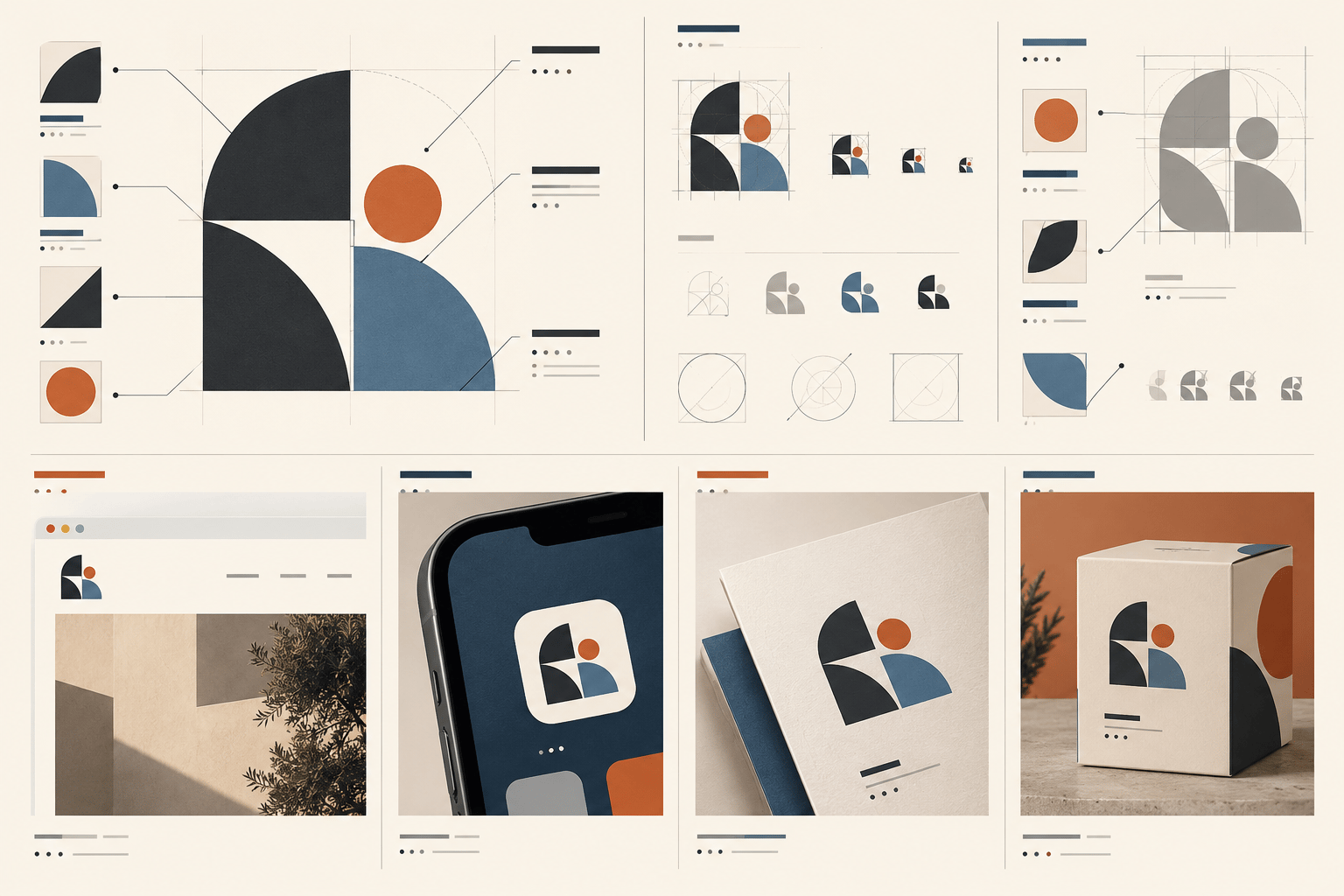
If you are asking “is my logo too complicated?”, do not start by counting the number of shapes. A logo can contain several parts and still be clear. Another can use one simple symbol but become confusing because of poor spacing, competing details, or an unclear relationship between the mark and the name.
Logo complexity is a communication problem when people cannot identify the main idea quickly, remember the silhouette, or use the mark reliably at the sizes and in the places that matter. The answer is not always a complete redesign. Often, the useful fix is a responsive version, better hierarchy, a cleaner export, or the removal of one detail that disappears in real use.
What does “too complicated” mean in logo design?
“Complicated” is not a style category. It describes what happens when a visual system asks viewers to process more information than the situation allows. Review complexity across four dimensions: visual detail, structural hierarchy, application fit, and system burden. The goal is not maximum simplicity; it is enough structure to be distinctive and enough control to remain usable.
- Visual detail: small lines, textures, gradients, internal shapes, and decorative effects.
- Structural hierarchy: whether one primary idea is easy to find among supporting elements.
- Application fit: whether the mark remains legible at the sizes and distances people actually encounter.
- System burden: how difficult it is to reproduce, explain, export, and maintain consistently.
Six signs your logo may be too complicated
1. The silhouette disappears at small sizes
Reduce the logo to a favicon, mobile navigation mark, or social profile image. If the outer shape becomes an indistinct blob, the identity may need a compact version or clearer silhouette. Test actual pixel sizes: fine outlines can vanish, enclosed spaces can close, and nearby elements can merge.
2. There is no clear first read
A viewer should not need to decode every component before understanding the mark. If the symbol, wordmark, tagline, border, and accents compete equally, reduce the contrast or size of supporting elements and define one canonical arrangement.
3. Details collide in production
Thin gaps can close in embroidery, small text can fill in on low-quality print, and overlapping shapes can fail in one-colour reproduction. Judge complexity against real use cases rather than an abstract preference for minimalism.
4. The logo needs an explanation every time
A meaningful story does not guarantee a clear visual read. If people consistently need a paragraph to explain the symbol, test whether the metaphor is too layered or several concepts have been combined.
5. There are too many official versions
If teams keep asking which of several lockups to use, the system itself is complex. Create a short hierarchy: primary lockup, compact lockup, symbol where justified, and one-colour or reversed versions.
6. The logo competes with surrounding content
Place the logo in realistic layouts with real navigation and product content. If it dominates every composition, establish a calmer display version before redrawing the symbol.
A five-minute logo complexity test
- Define the job: write down the three most important applications and the smallest meaningful size.
- View it briefly: show the logo for a few seconds and record what a neutral viewer noticed.
- Remove colour: test grayscale and one-colour versions to reveal whether effects are doing the work.
- Check the silhouette: reduce or blur the mark and see whether its outer form remains identifiable.
- Inspect details: mark every line, gap, label, and texture that disappears, closes, or collides.
- Place it in context: test a website header, mobile interface, document, and physical or printed use.
- Classify the problem: separate detail, hierarchy, file quality, application fit, and strategy.
- Retest one change: make the smallest plausible intervention and compare it with the original.
Should you simplify the logo or create variants?
Use a variant when the core identity is recognisable and the problem is tied to size or context. Use simplification when a detail repeatedly disappears, collides, or creates production errors. Choose a broader redesign only when the complexity reflects a deeper problem such as a changed name, audience, offer, or positioning.
How to simplify without making the logo generic
Start with an inventory of elements and assign each one a job. Remove effects before removing the core silhouette, separate supporting text before redrawing the symbol, increase spacing where forms collide, and build responsive versions for different sizes. Keep an archive of the original artwork and retest the same applications before committing.
The Logo Evaluation Criteria page provides a broader framework for clarity, distinction, scalability, and application fit. For a general quality review, see What Makes a Good Logo?. If the issue is that the mark blends into its category, read Why Your Logo Looks Generic.
When you have gathered the files and examples, try the Logo Review Tool for a structured second opinion. Treat its output as review prompts, not an automatic redesign brief. For accessibility guidance around supporting interface text and controls, consult the W3C Web Content Accessibility Guidelines.
Factual basis
This guide is based on observable design-review practices: testing marks at actual sizes, checking one-colour and production-specific use, comparing hierarchy in context, and separating application constraints from identity strategy. These are review prompts, not guarantees of recognition or business performance.
Ready for a structured second opinion?
Upload your logo and review the evidence with the Logo Review Tool.