Logo Review Guide
How to Evaluate a Logo Before Launch: A Pre-Launch Guide
Use this practical pre-launch logo evaluation checklist to test readability, scalability, color, real-world use, and brand fit before your logo goes public.
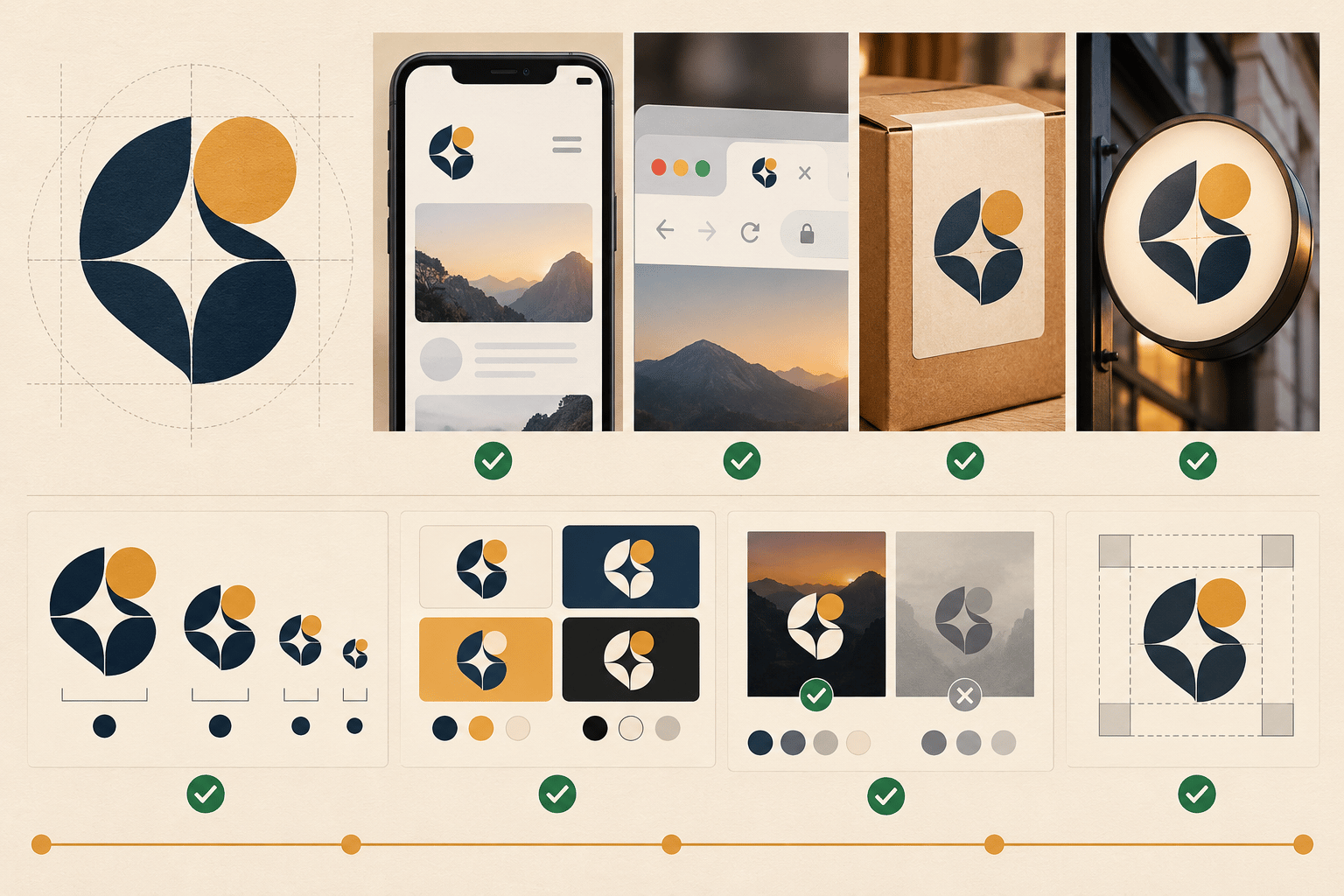
A logo can look finished in a design file and still fail in the places people actually see it: a browser tab, mobile header, social profile, printed receipt, or sign across a room. A pre-launch logo review should ask more than “Do I like it?” Ask whether the logo communicates clearly, works consistently, and feels right for the brand in real situations.
Before you start: review the logo in context
Collect the primary logo, alternate lockups, symbol, horizontal and stacked versions, light and dark versions, one-color artwork, and the vector master. Start with the main logo on a neutral background, then repeat the checks for the versions your team will publish. Our Logo Evaluation Criteria page provides a shared checklist when several people are reviewing the same design.
1. Check readability at the size people will see it
Test the logo at its smallest important size: a website navigation bar, favicon, social avatar, email signature, product label, or presentation footer. Ask someone to identify what they noticed without zooming in. Look for merged letterforms, disappearing strokes, crowded spacing, and details that become noise. If a wordmark or tagline has a minimum size, write that rule down instead of shrinking it indefinitely.
2. Test scalability from tiny to large
Compare the mark at small, medium, and large sizes. At small sizes, inspect legibility and silhouette. At large sizes, inspect curves, joins, spacing, and rough edges. A raster export is not a substitute for vector artwork, and a complex mark may need a simplified lockup or symbol-only version. Document which version works at which size.
3. Review the logo in one color
View the logo in solid black, solid white, and one brand color. This reveals overlapping forms that only separate because of color, gradients carrying too much meaning, thin outlines, low-contrast details, and symbols that lose their identity without color. The mark does not need to look identical everywhere, but you should know what happens when color is unavailable or displayed differently.
4. Test backgrounds, contrast, and clear space
Place the logo on a light neutral, dark neutral, brand-colored surface, and a moderately busy image if photography is part of the identity. Check the surrounding clear space as well as the logo itself. Define when to use a reversed version, container, or outline. For interface text and adjacent content, use the W3C WCAG guidance as the accessibility reference.
5. Put it into real use cases
Review the logo where decisions are made, not only on an artboard. Test a website header and footer, mobile screen or app icon, social profile, email or proposal, packaging, invoice, presentation, and storefront or sign. Simple screenshots are often more revealing than polished mockups. Notice cropping, alignment, clear space, and competition with nearby information. Compare the approach with this Coffee Shop Logo Review.
6. Check whether the logo fits the brand
Write the intended qualities in concrete terms—calm, precise, welcoming, practical, independent, or energetic. Then ask whether the shape, typography, proportion, and color support those qualities; whether the mark fits the category without becoming interchangeable; and whether it can grow with the product and audience. Ask people who are not attached to the design what they notice first, before explaining the concept.
7. Review consistency across logo versions
Compare lockups side by side. Check symbol and wordmark proportions, type size and weight, spacing, clear-space rules, line weights, visual density, and color behavior on light and dark backgrounds. Keep usage guidance close to the files, including minimum size, background restrictions, naming, and which version to use in each placement.
8. Turn the review into decisions
Sort findings into Keep, Revise, and Test Again. Replace “make it pop” with an observable note such as “the tagline is not readable in the mobile header” or “the symbol loses its outline in one color.” Choose the smallest change that addresses the highest-impact problem, then retest the weakest application.
Use a logo review tool for a second pass
After your own assessment, try the Logo Review Tool for a structured second pass across clarity, contrast, color, scalability, typography, uniqueness, versatility, application, and commercial fit. Use its output as prompts for discussion—not as a replacement for context, production testing, or design judgment.
Final pre-launch checklist
- The name remains readable at the smallest important size.
- The mark has a clear silhouette and does not rely on color alone.
- The logo works in one color and on expected backgrounds.
- Light, dark, compact, and wide versions are available where needed.
- Clear space and minimum-size guidance are written down.
- The logo has been tested in digital, social, document, and physical contexts.
- The visual tone supports the brand’s intended qualities.
- Feedback has been translated into specific decisions and organized files.
For another perspective, read How to Know If Your Logo Is Good and How to Critique a Logo. When the checks are complete, your logo is not merely ready to present—it is ready to use consistently.
Questions designers ask
Logo evaluation FAQ
What should I check first when evaluating a logo?+
Start with the smallest important use case. Confirm that the name or symbol remains readable, recognizable, and visually balanced before moving on to color, applications, and brand fit.
How do I know if a logo scales well?+
Compare it at 16px, 32px, 64px, and a larger display size. Look for disappearing strokes, closed counters, crowded spacing, and details that become visual noise.
Should a logo work in black and white?+
Yes. A one-color version exposes weaknesses hidden by gradients or color separation and gives the brand a reliable option for documents, stamps, production, and constrained media.
How many real-world applications should I test?+
Test at least five contexts that matter to the business, such as a website header, mobile or social avatar, document, packaging, and physical signage. Prioritize actual use cases over decorative mockups.