Logo Review Guide
How to Organize Logo Files for a Clear Handoff
Learn how to name and organize logo handoff files so teammates, clients, and production partners can find the right approved asset without guessing.
A logo handoff should help the next person make a decision quickly: which file is approved, which version fits the placement, and what should not be changed. If every asset is called final.png, or the editable source is mixed with upload-ready exports, even a good logo becomes difficult to use.
Organizing logo files is not about creating the biggest possible archive. It is about making the approved identity easy to find, understand, and use. A clear naming system gives a designer, developer, marketer, printer, or client the same map. It also reduces the chance that an old exploration or incorrectly flattened export gets used by mistake. This guide focuses on the information architecture of a logo handoff: folders, filenames, status labels, variant names, and a short read-me. For the role of SVG, PNG, EPS, PDF, and editable files, see the logo file formats delivery guide.
Start with the questions
Define the decisions the folder must answer
Before renaming anything, list the questions a recipient will ask. A useful handoff should make these answers visible without opening every file:
- Is this approved artwork? Separate approved files from drafts, experiments, and archived versions.
- Which arrangement is this? Identify the full lockup, wordmark, symbol, stacked lockup, or another approved variant.
- What treatment does it use? State full colour, black, white, reversed, or another approved treatment.
- Where should it be used? Identify web, print, social, presentation, packaging, or a vendor workflow when it matters.
- What can the recipient edit? Point to the source file and list fonts, linked assets, permissions, and dependencies.
These questions create the structure. Do not begin with a long list of extensions and then ask users to work out the meaning themselves.
Use a small, predictable folder structure
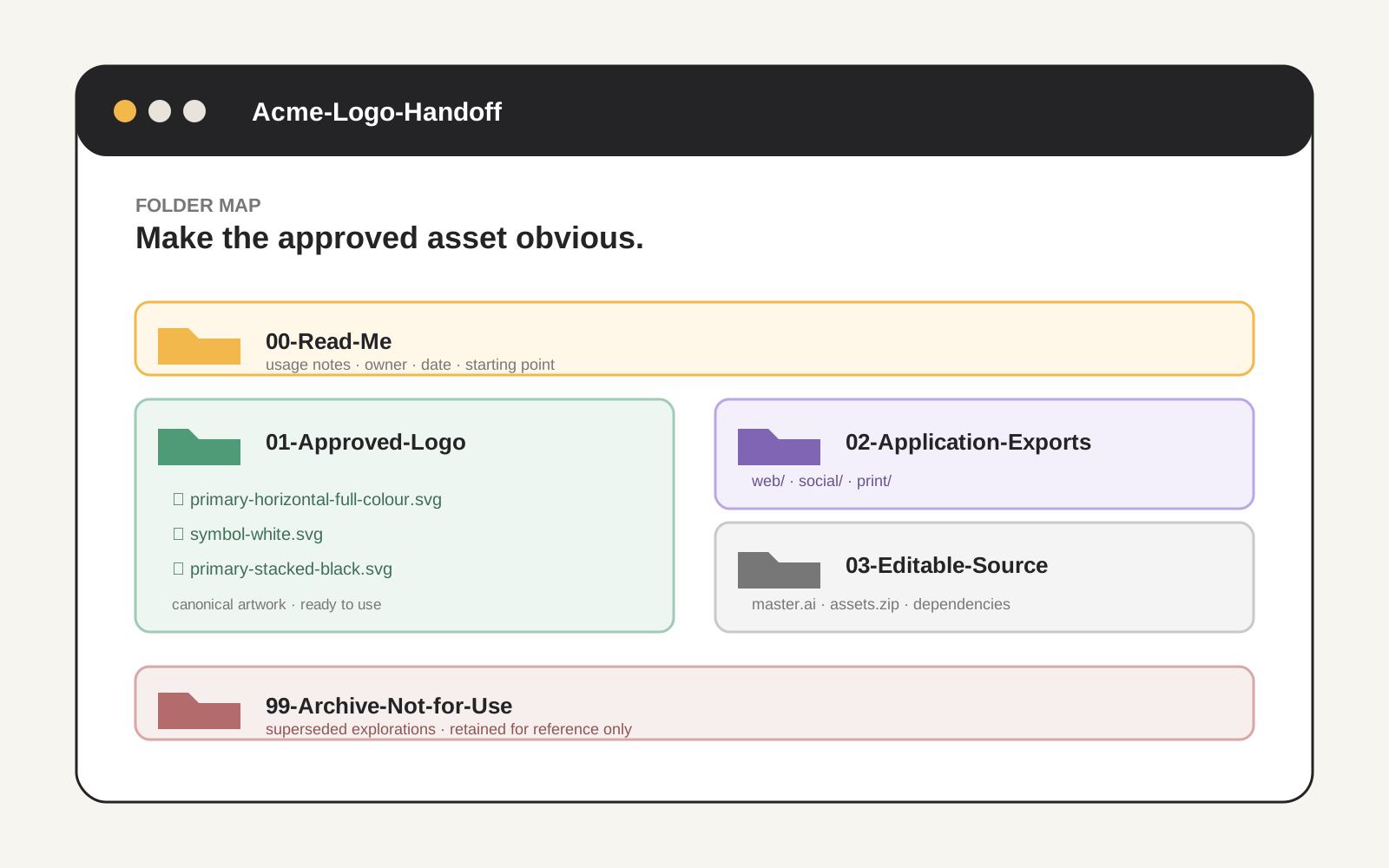
A handoff folder can stay simple while separating the important categories. For example:
Acme-Logo-Handoff/
├── 00-Read-Me/
│   └── logo-usage-notes.pdf
├── 01-Approved-Logo/
│   ├── logo-primary-horizontal-full-colour.svg
│   ├── logo-primary-horizontal-black.svg
│   └── logo-symbol-white.svg
├── 02-Application-Exports/
│   ├── web/
│   ├── social/
│   └── print/
├── 03-Editable-Source/
│   ├── logo-master.ai
│   └── logo-master-assets.zip
└── 99-Archive-Not-for-Use/
The exact numbers are optional. Their purpose is to create stable order and make the top-level choices obvious. Keep approved artwork separate from application exports because a file prepared for one platform may have a fixed crop, background, or pixel dimension that is unsuitable elsewhere.
Keep the source folder separate too. An editable master may contain hidden layers, unused colours, live text, guides, or exploratory artboards. It is valuable for future work, but it should not be the file someone grabs for a website upload. If the source depends on fonts, linked images, plugins, or permissions, record those details in the read-me.
An archive folder is useful when old files need to be retained for history or rollback. Make its status unmistakable: Archive-Not-for-Use is clearer than a quiet folder named old.
Build filenames from stable parts
A practical filename usually describes the asset in a consistent order:
[brand]-[variant]-[orientation]-[treatment]-[application].[extension]Examples include acme-primary-horizontal-full-colour-web.svg, acme-symbol-white-social-square.png, and acme-primary-stacked-black-print.pdf. You do not need every part in every filename. Use only the attributes that help someone choose.
- Brand: helpful when files may leave the main project folder.
- Variant: use a controlled vocabulary such as primary, symbol, wordmark, or stacked.
- Orientation or shape: use horizontal, vertical, or square when relevant.
- Treatment: use full-colour, black, white, reversed, or transparent where meaningful.
- Application: use web, social-square, presentation, or vendor when the export is use-specific.
Use lowercase, hyphens, and plain ASCII characters if files will move through different operating systems or upload tools. Avoid spaces, unexplained abbreviations, emoji, and punctuation that may be interpreted by a URL or command line. Avoid misleading labels: logo-final-final-2.png tells the recipient neither what it is nor whether it is approved.
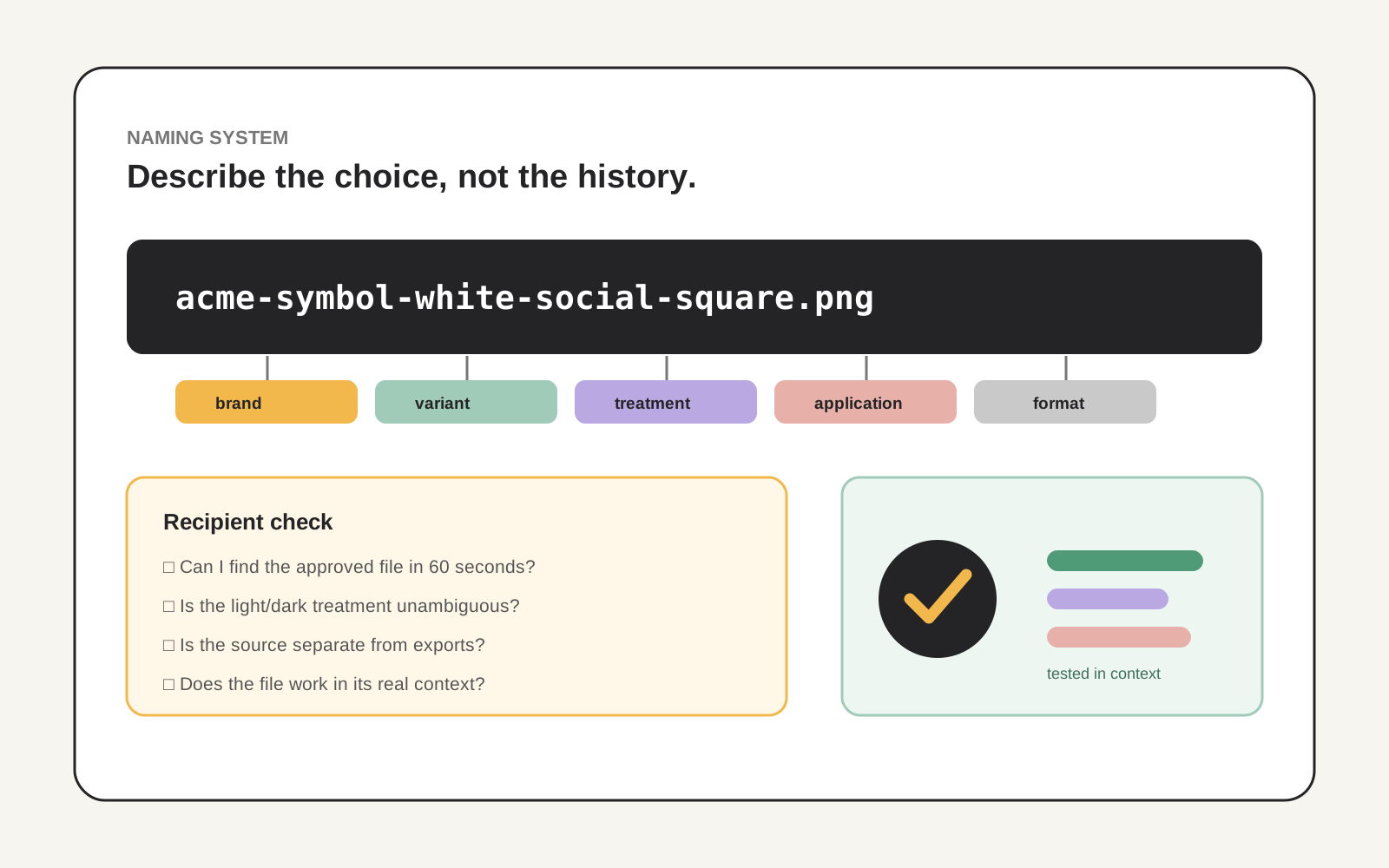
A filename should explain the choice the recipient needs to make, not preserve an improvised version history.
Separate status from appearance and write a read-me
“White logo” describes a treatment. “Approved” describes a status. They solve different problems, so do not force one word to carry both meanings. Use folder placement and a short read-me to identify approval status. A clear rule might be: every file in 01-Approved-Logo is approved, while every file in 99-Archive-Not-for-Use is excluded from production use.
The read-me is the handoff’s orientation layer. Keep it short enough to read, but include what is approved, where to start, background rules, clear space and minimum size, source application and dependencies, confirmed colour references, known limits, and the owner and date. It should help someone use the folder correctly and know where to ask when the folder does not answer a question.
Do not quietly include an icon-only mark, stacked arrangement, or dark-background treatment that was created by cropping or recolouring the primary logo. A tidy folder cannot make an unapproved asset official.
Review the folder as a recipient
Close the design application and approach the folder as a new teammate. Can you find a usable logo in under a minute? Can you tell which file belongs on a dark background? Can you distinguish the editable master from an upload-ready export? If not, improve the labels before adding more assets.
Open representative files in the tools that will receive them. Check approved artwork, dimensions, transparent edges, light and dark treatments, and application-specific crops. The transparent background guide explains why a filename such as “transparent” is not enough; test the actual file on contrasting backgrounds.
Then test the visual system in context. A full lockup may be right for a website header but too detailed for a small avatar. Read the social media profiles guide for crop decisions and the logo testing guide for broader checks. For a structured first pass on the mark itself, try the Logo Review Tool; treat its output as a discussion aid, then confirm the technical handoff with the actual files and receiving workflow.
The handoff test
If the recipient has to guess, the folder is not ready.
Deliver the smallest approved set that covers real applications. Clear boundaries and useful context are more valuable than a crowded archive of near-duplicates.
Organize logo files FAQ
What is the best way to name logo files?
Use a consistent order of meaningful attributes, such as brand, variant, orientation, colour treatment, application, and extension. For example, acme-symbol-white-social-square.png is more useful than final-logo-2.png. Include only the attributes that help someone choose, and use the same vocabulary throughout the folder.
Should logo source files and exports be in the same folder?
Usually, no. Keep editable source files in a clearly labelled source folder and place approved, ready-to-use exports in a separate folder. The read-me should point to the source and explain its dependencies, so a recipient does not mistake a working file for a production asset.
How many logo variants should a handoff include?
Include the smallest approved set that covers the actual applications: commonly a primary lockup, a symbol or compact version when needed, light and dark treatments, and relevant one-colour artwork. Do not create or include a variant simply because a folder feels incomplete.
Do I need a README for a logo handoff?
A short read-me is strongly recommended when more than one person, application, or production partner is involved. It should identify approved files, starting points, background rules, source dependencies, known limitations, and a contact.
Should archived logo files be deleted?
Not always. Keep historical files when they are needed for reference, approvals, or rollback, but put them in a clearly marked archive location such as 99-Archive-Not-for-Use. Do not leave superseded files beside approved assets.
A well-organized logo folder does not need to be elaborate. It needs a predictable structure, descriptive filenames, an honest approval boundary, and enough context for the next person to act without guessing. Use the logo design checklist for a wider review of clarity, scalability, and everyday use, then have the appropriate designer, developer, printer, or production partner confirm the final files for their workflow.